
Information
A Complete Guide to ERP and Its Importance in 2026
Discover what ERP is and how it centralizes your sales, inventory, HR, and finance. Explore key modules, workflows, and why modern ERP software is essential in 2026.
What Is ERP? A Complete Guide to ERP and Its Importance in 2026
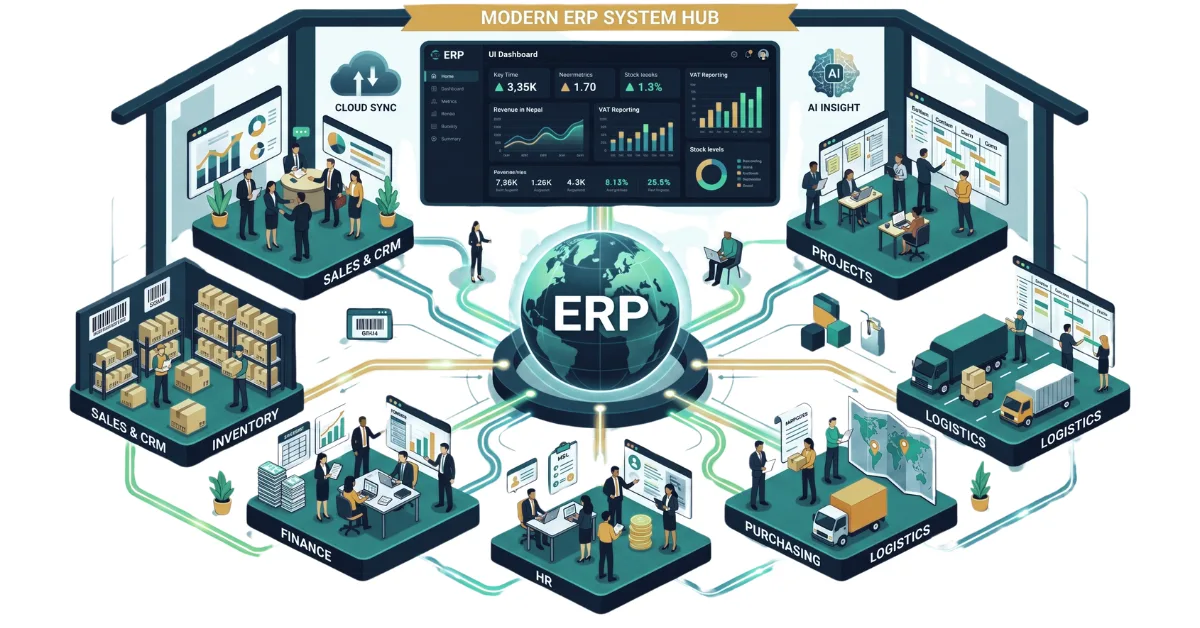
When you run a business, it is not just about selling a product. It's also a matter of keeping track. There are customers to talk to, workers to supervise, inventory to count, suppliers to pay, bills to send, tasks to finish, and reports to make. Initially a small business can survive with the help of tools such as spreadsheets and some applications. As the company grows everything starts to break down. The sales team knows one place where the data on the customers is stored. The finance staff employs a program that's still in a spreadsheet. This is where Enterprise Resource Planning (ERP) comes in. They are all interrelated elements of a business, and these are all brought together on a single platform with an ERP system. Instead of having operations scattered across different tools, an ERP ensures everyone works with the same information in one unified place.
What Is ERP?
ERP, also known as Enterprise Resource Planning is software that helps to manage and integrate business activities. Depending on the ERP it can contain sales and CRM, inventory management, purchasing, logistics, billing, finance, HR, project management, communication and reporting. The concept is straightforward. With the entry of information in one business process, it can be reused in another process without reentering data. The sales representative, for instance, creates a quotation for a customer. After confirming the deal, the same information can be utilized for Invoicing, Payment tracking, Stock Management, Delivery, etc. Without an ERP employees may have to enter or copy the information into several systems. With an ERP these activities can be connected.
How Does an ERP System Work?
Most ERP systems consist of various modular applications. All the modules address a part of the business; but the modules are designed to interact. Let's say you have a basic sales cycle, for instance: a lead goes to deal to quotation then to Invoice then to payment and finally, to delivery. For a company that sells products, the workflow begins with a purchase request, moves through approval to a supplier bill, then to goods receipt, warehouse intake, and finally into active stock. These processes need not be done by applications. With ERP, the relevant data can flow from one step to the next. Access can also be controlled based on a person's role. For instance, a sales representative may control offers and estimates, but does not have access to payroll data. This combination of workflows and controlled access is one of the key factors that make businesses go for ERP.
What are the key elements of an ERP system?
No single ERP module fits all companies' needs. A retailer will place a strong emphasis on inventory and sales features, while a software company will emphasize project management and HR features. A modern ERP can however cover a range of business activities.
1. Sales and CRM
Leads, Customers, follow-ups, Quotations and Contracts are the things with which sales staff spend a considerable amount of time. Having all that information in one place becomes useful to monitoring what is happening to each part.
A sales and CRM module may consist of:
- Custom deal stages and pipelines
- Contact and company details
- Activity and follow-up monitoring
- Reports from sales and salespeople
- Automated team assignment for deals.
- Quotations and proposals
- Custom Document Designs with PDF output.
2. Customer Communication
The platforms are often spread among the customers. The same business can be contacted by one customer on WhatsApp, another on Messenger and another on Instagram. These conversations can be centralized in a shared inbox. It will be able to handle WhatsApp, Messenger and Instagram chats, and delivery/presence data. Employees can be assigned a conversation and team members can use private notes and mentions to discuss a customer privately with each other.
Email communication, when branded, can be managed in this environment. It helps if there are multiple staff members handling customer service or sales and want to be aware of what others have spoken about.
3. Products and Inventory
As the number of products grows as do the number of warehouses and transactions, it becomes more challenging to manage inventory.
An ERP can manage product & stock data such as:
- Centralized product catalogues with SKUs, barcodes, and units.
- Custom product categorization and attributes
- Product expiry tracking
- Multiple warehouses
- Stock levels - by warehouse and batch
- Transfers of stock between warehouses.
- Alerts for low stock & reorder quantities
- Physical stock counting
- Stock movement history
Businesses can also load opening stock when importing their product catalogue, making the transition to the system easier. It can be particularly significant for companies that have batches, expiry dates or serial numbers.
4. Logistics and Delivery
Fulfillment and logistics are critical extensions of the sales process. Logistics can store information about shipment in a single location within the ERP. Businesses can record the carrier tracking number, dispatch status, delivery status and returns. Delivery notes can be created as branded PDFs and automatic tracking emails can keep the customers updated.
The system can also maintain proof of delivery details, such as the person receiving the shipment and when it was signed for. Late deliveries can be indicated without the risk of being lost in delivered orders.
5. Receivables
Once a sale is made the business needs to collect the money.
ERP billing capabilities are able to sync sales data and tie it to invoices and payments.
Additionally, businesses can control:
- Credit notes
- Sales returns
- Customer price lists
- Dealer pricing
- Accounts and statements of customers.
- Overdue payment reminders
If the ERP is linked to a website or customer portal information can be shared as well from the customer facing services to the internal system.
6. Purchasing and Payables
Businesses don't only keep track of what customers owe them. They also should be aware of what they should pay to the suppliers.
The procurement and payables module of an ERP system can manage supplier records, purchase requests, approval processes, supplier bills, payments and supplier statements. For instance, a purchase request may pass through the stages of approval before the order is placed. When the bill is sent to the supplier, this payment can be tracked from the system.
It is possible for businesses to also document company expenses, add receipts, and deal with reimbursement details.
7. Projects and Delivery
Not all businesses are involved in product sales. Service businesses such as IT companies, agencies, consultants etc. frequently require project management and time tracking of employees. An ERP can offer project boards for teams to create tasks, pass them through the stages and watch progress. Teams can store milestones, timesheets, comments, photos, and attachments directly within the project. Projects may have teams assigned as well. Integration of GitHub can link issues, branches and pull requests with project work for software development teams.
This means that project managers and developers can see what is going on in the development, while keeping their own records.
8. Employees and HR
Another aspect of a company is its employees. Information can be spread throughout spreadsheets, attendance devices and even along with separate payroll software.
These records can be consolidated in an ERP.
HR capabilities include employee profiles, attendance, browser based clock-in/clock-out leave requests, leave approvals, leave calendar, payroll, pay slips, tax deductions and punctuality reports. The system can also monitor assets assigned to employees by a company. Employee lifecycle businesses can utilize onboarding and offboarding checklists, an application intake and self-service employee portal.
9. Finance and Reporting
Owners of businesses don't require lists of transactions. They should be aware of the company's performance. An ERP dashboard can be designed to give all of the revenue, cost, profit, and sales activity and other business operations data in one place.
For businesses operating in Nepal financial reporting can include VAT, TDS and statutory schedules based on the Nepali year.
Reports can also be viewed on a team or individual basis as per the requirements of the business to measure. Exportable reports simplify the use of the information outside of ERP if it is needed.
10. Team Collaboration
There are some ERP systems that are used only for business transactions. Other items include items that employees use throughout the day. For instance an ERP can present a company notice board, private calendars and notes to the inner team chat.
The notifications can be shown in-app or via browser push notifications. The employees may also be able to set their preferences so they don't get all the notifications that the system throws.
These features might seem trivial in comparison to accounting or inventory. They can be helpful when already spending a lot of time in the ERP day-to-day.
Why ERP is Important in 2026?
Today's businesses manage tons of data in such areas as sales, finance, inventory, purchasing, human resources, and customer service. Keeping track of all this data in separate spreadsheets and using different software packages can be challenging to manage data correctly and timely.
An ERP system is able to tie all these business functions together in a single consolidated system. With the rise of businesses seeking more efficient process automation, access to real-time data, integration with the cloud, and the incorporation of AI tools, this is more relevant than ever in 2026.
Here are some of the primary reasons why ERP has continued to be significant to modern businesses.
1. Centralized Business Data
One of the greatest benefits of an ERP system is that it helps to centralize important business information. An ERP system links together the components of sales, inventory and financial processes into a single system, thereby eliminating the need to store the data in different applications.
For instance, inventory and financial information can be updated for the same sales order in the same system. This lessens the chance of all data being entered several times and simplifies the sharing of data between different departments.
2. Better Data-Driven Decision-Making
Good information is a key ingredient in business decisions. If data is spread over multiple systems, having a holistic view of business performance may take some time.
With ERP, managers get access to the data and reports in their connected business. They have access to data on sales, costs, stock levels, customers, and other aspects of operations to gain insight into the dynamics of the organization.
This enables them to see trends, track performance and make business decisions on the latest information and not just on assumptions or on old reports.
3. Automation of repetitive business processes
Many companies have to spend a lot of time on repetitive administrative tasks. Invoices, inventory updates, order processing, report generation and approvals are some of the activities that can often be automated. Many of these processes can be automated with ERP systems based on workflows. For instance, stocking could be updated automatically when an order is placed. The less that is done by hand, the more time that can be devoted to tasks that involve planning, problem solving, customer contact and other aspects of human judgment.
4. Real-Time Business Visibility
It is essential to have access to up-to-date information when businesses have to react rapidly to evolving circumstances. With a modern ERP system, you can access sales, inventory, purchase and cash flow information and monitor operations from a single screen or a reporting system. A business manager could view the inventory status without having to wait for other departments to create a separate inventory spreadsheet. This can aid businesses in recognizing the problem in advance and taking action right away.
5. Cloud and AI integration
ERP systems are also moving forward with the times of cloud computing and Artificial Intelligence. Cloud ERP enables companies to operate their systems over the web without having to rely on a single physical location for their infrastructure.
There's a potential for additional functionality from AI. AI capabilities can help predict sales, analyze data, process documents, handle customer inquiries, or find trends in business data, depending on the ERP solution.
6. Improved Scalability
A business's technology needs often change as it grows. Simple spreadsheets and stand-alone applications can become hard to manage as more employees, customers, products, transactions, locations, and departments are added to the mix. An ERP system can be scaled up as the business grows and integrate various business processes into a single platform. Businesses might possibly be able to add users, modules, locations or new processes without replacing all the systems that they already have in place.
For growing businesses, where operations demand that their business software must keep up with them, this is especially important when it comes to ERP.
7. Better inter-departmental integration
Departments may rely on information provided by other departments. The requirements for inventory information are met by sales, stock information by purchasing, transaction data by finance, and information from all points within the organization by management. If there is no integrated system, employees might be forced to send information via email, spreadsheet, or different applications.
ERP links these processes together and enables the information to travel between departments more efficiently. It is easier to coordinate daily activities and have a single view of the business when different teams use connected data.
What is ERP's future?
ERP goes beyond conventional accounting and inventory management. Modern systems are more integrated than ever with cloud services, APIs, automation, analytics, AI, communication systems, websites, payment systems, and other business applications. For instance, AI can help with data analysis, pattern recognition, predictions etc., or even with some repetitive tasks. Automation can take care of routine actions that would otherwise require manual work.
Integrations are also gaining importance. The ERP system can be integrated with the website, customer portal, social media websites, e-commerce platform, payment processors, or any development platform like GitHub. So, the direction is pretty straightforward – ERP is no longer just a repository for data, but the glue that holds the systems and processes that companies use every day together.
Conclusion
At the end, it is all about the integration of various aspects of a business. This can be accomplished within a single, unified platform, depending on the ERP and the modules that a company has selected, from sales and CRM to customer communication, inventory, purchasing, logistics, billing, finance, projects, HR and internal collaboration.
It is important to recognize that for every business, not all the modules are necessarily essential. For one company, inventory and warehouse management may be the priority. Another might require mostly CRM, project management and payroll. As a business scales, its system requirements expand. The key is to identify the ERP that aligns with the business's operations. With proper planning, data preparation, employee training and system setup, an ERP can provide a company with a much clearer picture of how things are and can decrease the work that needs to be done to keep various systems in sync.
The short version
Discover what ERP is and how it centralizes your sales, inventory, HR, and finance. Explore key modules, workflows, and why modern ERP software is essential in 2026.
Keep reading

What Is API Integration, and Why Does Your Business Need It?
API integration allows different software applications to communicate and exchange data automatically. Learn how API integration works, explore common business use cases, understand its benefits, and see how Getintoto can connect your existing systems with custom software solutions.
Read article
Custom Software Development in Nepal: Our Process From Idea to Launch
Explore how custom software development in Nepal turns a business idea into a practical digital product, from discovery and planning to development, testing, launch, and ongoing improvement.
Read article
AI Tools For Developers
AI is transforming the way developers approach software development by reducing repetitive tasks, simplifying complex workflows, and improving productivity. In this article, we explore practical AI tools that Nepali developers can use to minimize development fatigue, streamline everyday tasks, and focus more on building high-quality, innovative software solutions.
Read article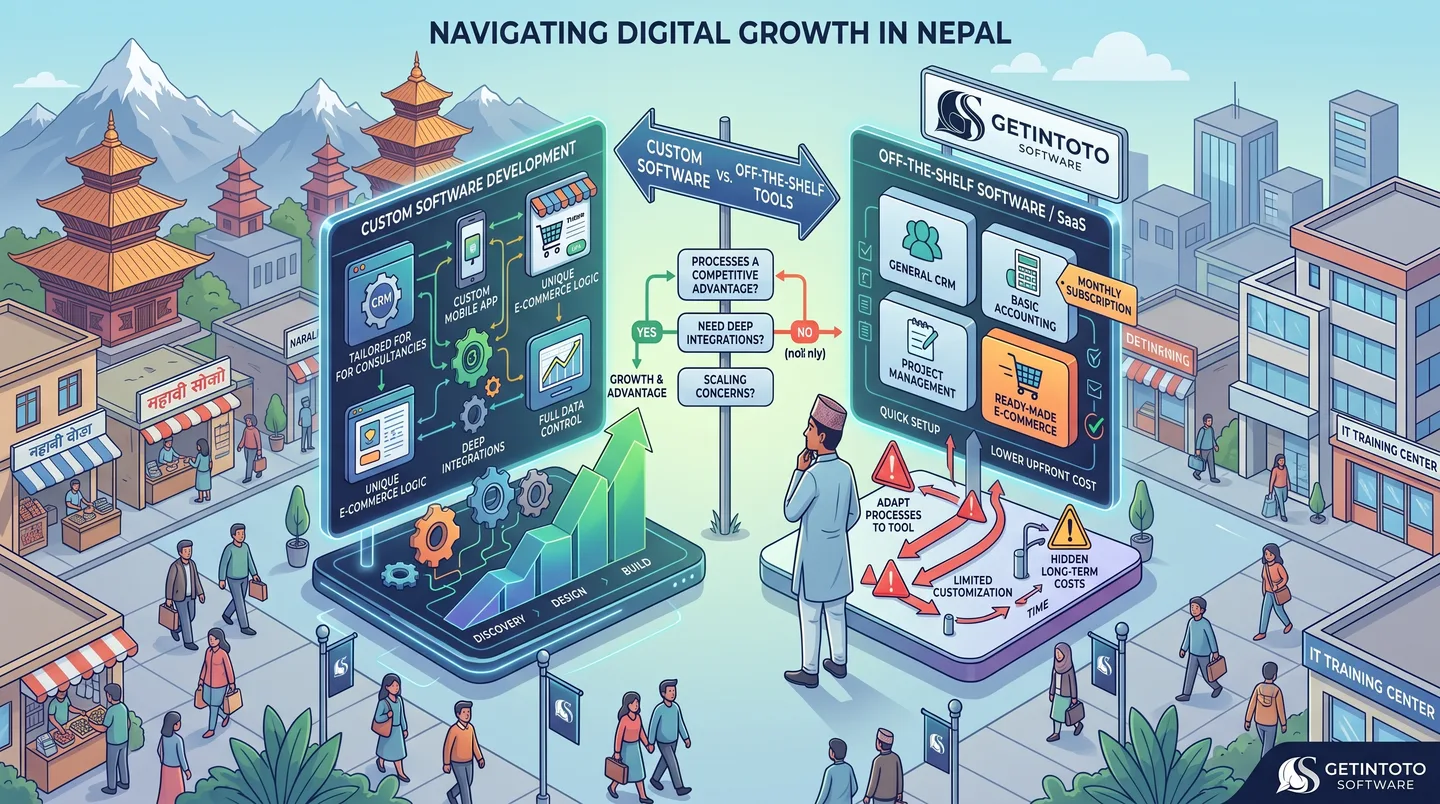
Custom Software Development And its Need
Choosing between custom software and off-the-shelf tools can be a difficult decision for growing businesses in Nepal. While ready-made software is quick to set up and often affordable, it may not fit the way your business actually works. Custom software takes a different approach by building features, workflows, integrations, and user experiences around your specific needs. This guide explains the key differences, when custom development makes sense, and when an existing tool may be the better choice for your business.
Read article
Laptop Specifications Demystified : A Clear Guide for Nepal
Confused by tech jargon? Master the basics of laptop hardware with our clear, beginner-friendly guide to buying the right laptop without overpaying in Nepal.
Read article
Things To Consider Before Buying a NEW LAPTOP in 2026
Stop buying laptops based on the processor name alone. Use our ultimate 2026 checklist to audit RAM, storage, and battery life before swipe-purchasing your next machine.
Read article