
Information
Custom Software Development in Nepal: Our Process From Idea to Launch
Explore how custom software development in Nepal turns a business idea into a practical digital product, from discovery and planning to development, testing, launch, and ongoing improvement.
Custom Software Development in Nepal: Our Process From Idea to Launch
A software project usually starts with a simple idea. Someone notices a problem, sees an opportunity, or thinks, “There has to be a better way to do this.” From there, the idea can quickly become much bigger. A few features turn into dozens of requirements. Different users need different things. Payments need to work, data needs to be protected, and the system needs to remain stable when more people start using it.
That is where software development becomes more than just coding.
At Getintoto Software, we work with businesses to turn these ideas into working digital products. Sometimes that means building a platform from scratch. In other cases, it means replacing an outdated system, connecting several existing tools, or taking a basic product and preparing it for a larger audience.
Our focus is simple: understand what the business actually needs, build the right solution, and leave room for the product to grow.
A Good Software Project Starts With the Problem, Not the Technology
It is easy to start a project by discussing programming languages, frameworks, databases, or cloud platforms. Those things matter, but they are not usually the first questions we ask. The first question is, what are we trying to solve?
A company might tell us that it needs a mobile app. After discussing the project, we may find that the real problem is an inefficient booking process. Another business may ask for a custom CRM when what it really needs is a simple internal system that brings customer information, sales activity, and reporting into one place. Understanding that difference can change the entire project.
Understanding How the Business Works
Before development begins, we look at how people currently do their work. That can include talking through existing processes, identifying repetitive tasks, understanding who needs access to which information, and looking at the systems the business already uses. This gives us a better starting point than simply working from a list of requested features.
Deciding What Should Be Built First
A new platform does not need to contain every possible feature on its first day. For example, an online marketplace might initially need user accounts, listings, search, payments, and an administration panel. Advanced recommendations, complex automation, or additional integrations can come later when there is a clear reason to add them. Starting with the core product makes it easier to launch, collect feedback, and decide what deserves attention next.
Turning an Idea Into Something People Can Actually Use
A technically sound application can still be frustrating if the user experience is confusing. People might have to figure out how your software works before they can use it.
Mapping the User Journey
We look at what a user needs to accomplish and how many steps it takes to get there. For a service platform, the journey might look something like this:
Find a service → Choose an option → Submit details → Pay → Receive confirmation → Manage the booking
Each step needs to make sense from the user's perspective. This is particularly important for platforms where customers are using the product for the first time. A complicated interface can quickly turn a useful service into a difficult one.
Designing for Different Devices
A platform may be used from an office computer in the morning and from a smartphone later in the day. Responsive design is therefore not something we consider at the end of development. The interface needs to work properly across the devices that the target users actually use.
Choosing Technology Based on the Product
There is no universal technology stack that makes every software project successful. A startup launching its first MVP has different requirements from an established company processing thousands of transactions every day.
Keeping the Technology Practical
We consider the product's requirements, expected users, integrations, security needs, budget, and future plans before deciding how the system should be built. Sometimes the best solution is relatively simple. That is worth saying because software can become unnecessarily complicated when technologies are selected for their popularity rather than their relevance to the project. The technology should serve the product, not become the product.
Leaving Room for Growth
At the same time, a system should not be designed without considering what happens when the business grows. Database structure, application architecture, APIs, hosting, and background processes can all affect how easily a platform can handle increased usage. The goal is not to build for an imaginary million users on day one. It is to make sensible technical decisions now that do not create unnecessary problems later.
Security Has to Be Considered From the Beginning
Security is easy to overlook when everyone is focused on getting a product launched. It becomes much harder to ignore when the platform is already handling customer information, payments, business records, or internal data.
Protecting Access and Data
Depending on the project, security considerations can include authentication, role-based permissions, encrypted communication, input validation, secure APIs, database protection, backups, and monitoring. The exact approach depends on what the platform does and what kind of information it stores. For us, security is part of the development process rather than something that gets added as a final checklist item.
Making Different Systems Work Together
Most businesses already use several software tools. There may be a website, accounting system, CRM, payment gateway, email platform, inventory system, analytics tool, or other third-party service. The new platform often needs to communicate with some or all of them.
Using APIs to Connect the Pieces
APIs allow different systems to exchange information. Imagine an e-commerce platform receiving an order. That order may need to move through several systems:
Website → Payment Gateway → Order Management → Inventory → Accounting → Customer Notification
When these connections are handled properly, employees spend less time moving information manually from one system to another. For a business, that can be more valuable than simply adding another feature to the website.
Building on the Cloud Without Making Things Complicated
Cloud infrastructure gives businesses flexibility when their software needs change. A growing application may eventually need more computing capacity, better database performance, additional storage, improved monitoring, or stronger backup systems.
Planning Infrastructure Around Actual Needs
We do not believe every project needs an unnecessarily complex cloud architecture. The infrastructure should match the application. A smaller platform may need a straightforward setup that is easy to manage. A larger application with significant traffic or demanding integrations may require a more sophisticated architecture. The important part is knowing why a particular infrastructure decision is being made.
Where AI and Automation Actually Make Sense
AI is now part of many conversations about new software products. But adding an AI feature does not automatically make a platform better. The useful question is, what problem will it solve?
Finding Practical Uses for AI
Depending on the business, AI might be useful for customer support, document processing, search, recommendations, data analysis, content classification, or repetitive internal tasks. For example, an internal business system might use automation to take information submitted through a form and route it to the appropriate team instead of requiring someone to do that manually. That is a practical use of technology because it addresses a specific problem.
Testing What We Build Before Real Users Do
A feature working during development does not necessarily mean it is ready for production. Real users behave differently. Different devices behave differently. Integrations can fail. Unexpected data can expose problems that were not obvious during development.
Testing the Important User Flows
We test the parts of the platform that users and administrators depend on. That can include registration, login, permissions, forms, payments, notifications, dashboards, integrations, and other core functions.
Looking Beyond Whether a Feature Works
We also need to know how the application behaves under different conditions. Performance, security, browser compatibility, error handling, and deployment configuration can all affect the experience after launch. Finding these issues before customers encounter them is considerably easier than dealing with them after a public launch.
The First Launch Is Not the Final Version
Launching software does not mean the development process is finished. Once real people start using the product, you learn things that are difficult to discover beforehand. Users may struggle with a particular step. A business process may change. A frequently used feature may need improvement. A new integration may become necessary.
Using Real Feedback to Improve the Product
After launch, we can look at user feedback, application behavior, analytics, and support requests to understand what should happen next. This creates a much more useful development cycle:
Build → Launch → Learn → Improve
Instead of trying to predict every future requirement before launch, the product can develop based on what the business and its users actually need.
Why This Matters for Businesses in Nepal
Businesses in Nepal are adopting digital tools for very different reasons. A travel company may need a booking platform that connects customers, payments, and internal operations. An educational institution may need a system for managing students, courses, and administrative work. An e-commerce business may need its website to work smoothly with payments, inventory, order management, and accounting.
For growing businesses, the challenge is often not simply getting a website or mobile app. Existing processes may depend on spreadsheets, manual data entry, disconnected software, or systems that no longer support the way the business operates. Custom software can bring these processes together and give teams a system built around how they actually work.
Building for Local Businesses and Global Customers
Developing software in Nepal does not mean the product has to be limited to the Nepali market. Businesses can build products for local customers, international clients, or both. That means considering performance, scalability, integrations, usability, and security from the beginning.
At Getintoto Software, we work with businesses to understand their existing processes and turn those requirements into practical digital solutions. Whether the goal is to build a new platform, improve an existing system, connect different tools, or automate repetitive work, the technology needs to fit the business rather than the other way around.
What Our Software Development Process Looks Like in Practice
Our approach becomes clearer when you look at the products we've built. These projects span different industries and business requirements, but each started with a specific problem that needed a practical solution. Our portfolio includes projects across different industries, which means the requirements and technical challenges are not always the same.
Cosmic CRM: Building Around a Specific Business Workflow
A good example of problem-focused software development is Cosmic CRM, a CRM platform built for education and study-abroad consultancies. Instead of treating CRM as a generic collection of customer records, the platform brings together areas such as lead management, application tracking, payment information, and university matching.
Projects like this show why understanding the business process before development matters. The software needs to reflect how the team actually works rather than forcing the team to adapt to a system that was designed for a different purpose.
Travel Trip Nepal: Creating a Digital Experience for Travel Businesses
Travel businesses have their own set of requirements. Customers need to discover experiences, understand what is included, compare options, and take the next step toward booking.
Our work with Travel Trip Nepal is an example of building a digital platform around that customer journey. The focus is not simply on putting travel information online. The platform needs to present experiences clearly while supporting the business processes behind those customer interactions.
This is where user experience, content structure, business requirements, and technology all come together.
Kandidex: Applying AI to a Practical Business Problem
AI is most useful when it addresses a specific problem rather than being added simply because it is a current technology trend.
Kandidex is an example of this approach. The platform uses AI-driven interview analysis as part of the hiring process, helping businesses approach candidate evaluation through a more technology-driven workflow.
The project demonstrates an important principle we follow: technology should have a clear purpose within the product. AI is not the product by itself; it is one part of a larger solution designed around a business need.
TG-Unify: Turning an Operational Need Into a Mobile Application
Not every software project begins with the need for a large web platform. Sometimes a business needs a focused mobile application that fits into an existing day-to-day operation.
TG-Unify is a mobile application developed for Triveni Group of Companies as a mess-management solution. A project like this requires more than building screens for a mobile device. The application needs to reflect the organization's actual workflow and make everyday tasks easier to manage.
This is another example of why the development process should begin with understanding the problem and the people who will use the software.
Different Products, the Same Development Principle
These projects serve different purposes, users, and industries, but the underlying approach remains similar: understand the problem, define the requirements, choose appropriate technology, build around the users, and leave room for the product to evolve.
Whether the project involves a CRM, travel platform, AI-powered application, mobile solution, or another type of business software, the technology should support the way the business needs to operate.
That is ultimately what custom software development is about—not simply building more software, but building something that has a clear purpose for the people and business using it.
How Getintoto Takes a Software Project From Idea to Launch
Every software project starts differently. Some clients come to us with a detailed product concept, while others know they have a problem but are not yet sure what the right technical solution looks like. Our job is not simply to take a list of features and start coding. We work with the client to understand the problem, define what needs to be built, make the technical decisions, and gradually turn the idea into a working product.
Here is how we generally approach a software project at Getintoto.
Discovery
We start by talking about the business before talking too much about the technology. During the discovery stage, we want to understand what the business is trying to achieve, who will use the software, how the current process works, and where the existing problems are. Sometimes a client already has a detailed specification. In other cases, the requirements are still taking shape. We work through those requirements together and identify the parts that need further clarification. We also look at existing software, manual processes, third-party tools, and integrations that may be part of the project. The outcome of this stage is a clearer understanding of what needs to be solved and why. That gives the rest of the project a much stronger starting point.
Planning
Once we understand the project, we break the requirements into manageable parts. We identify the core features, user roles, workflows, integrations, technical requirements, and priorities. If the project is large, we also look at what should be included in the first release and what can be developed later. This is where we start making decisions about the application's architecture, database structure, APIs, technology stack, hosting requirements, and other technical considerations. We don't try to make everything unnecessarily complicated at this stage. Our aim is to create a plan that is practical for the current project while leaving enough room for future changes.
UI/UX Design
Once we know what the platform needs to do, we look at how people will actually use it. Our UI/UX process focuses on the user's journey through the product. We consider how someone finds information, completes an action, moves between different sections, and understands what to do next. For example, an administrative dashboard may contain many functions, but that does not mean all of them need to be displayed at once. We organize the interface around the tasks administrators perform most often. We also consider responsive behavior so the product works properly across desktops, tablets, and mobile devices where required.
Good design, in our view, is not about adding visual elements simply to make a screen look impressive. It is about making the software easier to understand and easier to use.
Development
This is where the plan starts becoming a working application. Our developers build the platform in stages, working through the agreed features and technical requirements. Depending on the project, this can involve frontend development, backend development, database implementation, API development, third-party integrations, authentication, payment systems, cloud infrastructure, or other components. We keep the development connected to the original business requirements rather than treating coding as a separate activity. As development progresses, we also review how different parts of the system work together. A feature might work on its own but still need adjustments once it interacts with another part of the platform. That is why development is an iterative process rather than simply moving down a checklist of features.
Testing
We don't consider a feature finished simply because it works in the developer's environment. Before deployment, we test the important workflows and functions of the application. Depending on the project, this can include user registration, login, permissions, forms, dashboards, payments, notifications, APIs, integrations, and other core features. We also look at how the application behaves across different devices and browsers where relevant. For more complex platforms, performance, security, error handling, and other technical aspects also need attention. The purpose of testing is not only to find obvious bugs. It is to make sure the different parts of the platform work together as expected before real customers or employees start relying on them.
Deployment
Once the application has passed the required testing, we prepare it for deployment. This can involve configuring the production environment, setting up databases and services, connecting domains, configuring APIs, preparing cloud infrastructure, and making sure the necessary security and access settings are in place. The deployment process depends heavily on the project. A small web application may have a relatively straightforward deployment, while a larger platform with multiple services and integrations requires more preparation.
Our goal is to make the transition from development to production as smooth as possible and ensure the system is ready for actual use.
Ongoing Support
For us, launching a platform is not necessarily the end of the relationship. Once a product is being used by real people, new requirements naturally appear. Users may provide feedback, the business may introduce a new service, an external API may change, or a feature that seemed sufficient during the initial release may need to be expanded. We can continue supporting the platform through maintenance, bug fixes, performance improvements, security updates, new integrations, feature development, and technical optimization. This ongoing work also gives us an opportunity to understand how the product is performing in practice rather than relying entirely on assumptions made before launch.
Build the Product You Need, Not Just the Software You Asked For
There is an important difference between delivering a list of features and solving a business problem. A successful digital platform needs to make sense for the people using it, the team managing it, and the business paying for it. That means thinking about the product before thinking about the code. It means making practical technology choices, keeping the user experience clear, taking security seriously, and avoiding unnecessary complexity. Most importantly, it means leaving the product in a position where it can change as the business changes.
Have a Digital Product Idea? Let's Talk
If you have been thinking about building a new platform, replacing an outdated system, or turning a manual business process into software, the first step does not have to be a technical specification.
Start with the problem.
Tell us what you are trying to achieve, how your current process works, and where things are becoming difficult. From there, Getintoto Software can help you explore the right approach—from custom software and web applications to mobile apps, AI integrations, automation, cloud solutions, and ongoing development. At Getintoto Software, we work with businesses to turn these ideas into working digital products. Sometimes that means building a platform from scratch. In other cases, it means replacing an outdated system, connecting several existing tools, or taking a basic product and preparing it for a larger audience.
The short version
Explore how custom software development in Nepal turns a business idea into a practical digital product, from discovery and planning to development, testing, launch, and ongoing improvement.
Keep reading
AI Tools For Developers
AI is transforming the way developers approach software development by reducing repetitive tasks, simplifying complex workflows, and improving productivity. In this article, we explore practical AI tools that Nepali developers can use to minimize development fatigue, streamline everyday tasks, and focus more on building high-quality, innovative software solutions.
Read article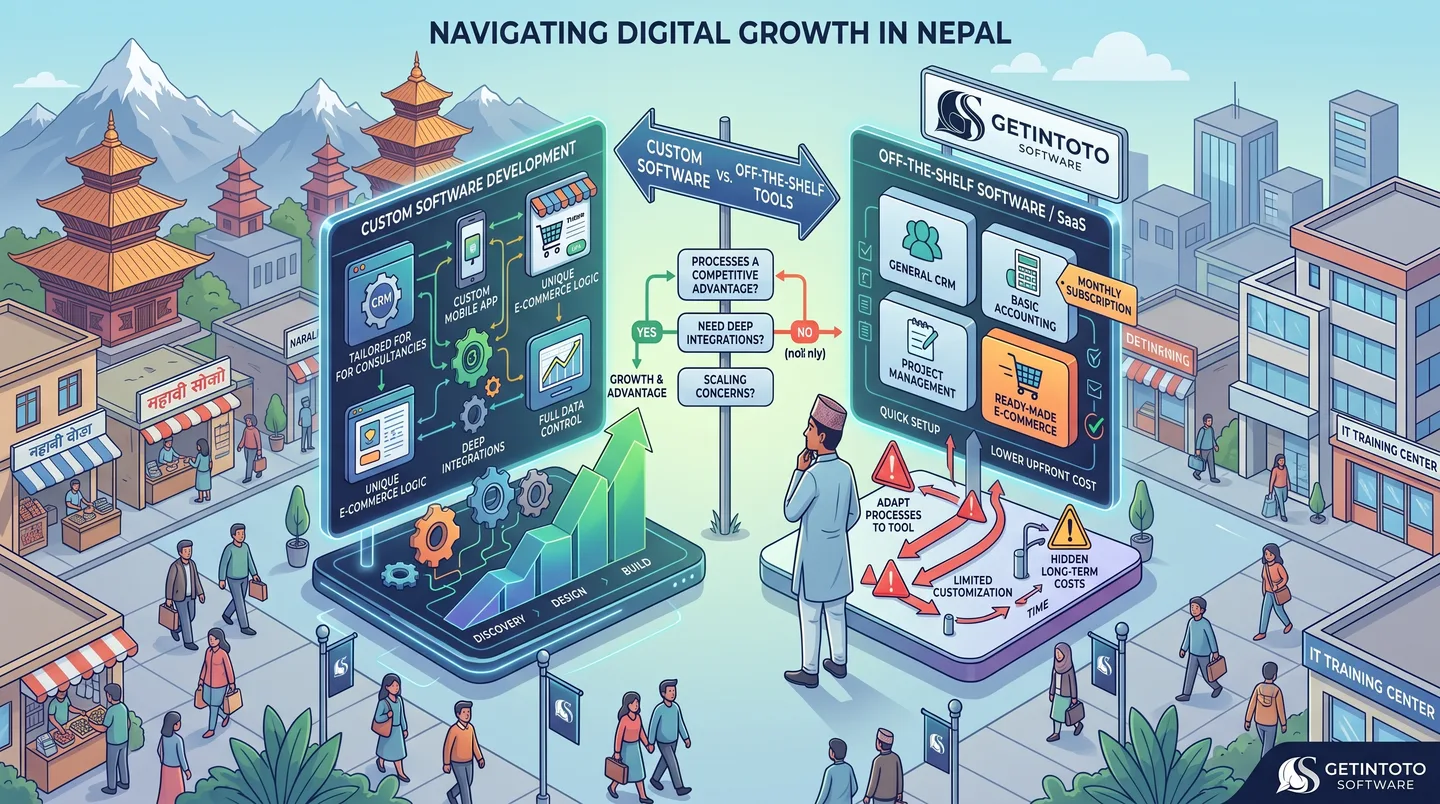
Custom Software Development And its Need
Choosing between custom software and off-the-shelf tools can be a difficult decision for growing businesses in Nepal. While ready-made software is quick to set up and often affordable, it may not fit the way your business actually works. Custom software takes a different approach by building features, workflows, integrations, and user experiences around your specific needs. This guide explains the key differences, when custom development makes sense, and when an existing tool may be the better choice for your business.
Read article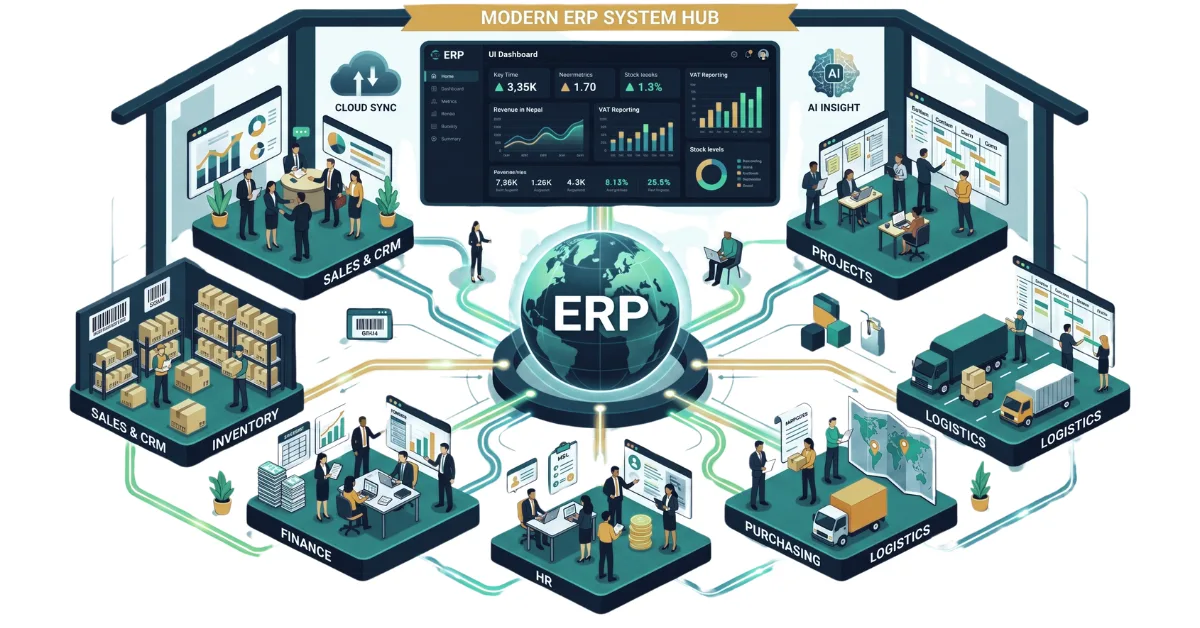
A Complete Guide to ERP and Its Importance in 2026
Discover what ERP is and how it centralizes your sales, inventory, HR, and finance. Explore key modules, workflows, and why modern ERP software is essential in 2026.
Read article
Laptop Specifications Demystified : A Clear Guide for Nepal
Confused by tech jargon? Master the basics of laptop hardware with our clear, beginner-friendly guide to buying the right laptop without overpaying in Nepal.
Read article
Things To Consider Before Buying a NEW LAPTOP in 2026
Stop buying laptops based on the processor name alone. Use our ultimate 2026 checklist to audit RAM, storage, and battery life before swipe-purchasing your next machine.
Read article
What is SEO and Why does every business need it in 2025?
Want your website to rank on the first page of Google? Learn exactly how SEO works and why it is the ultimate survival tool for digital businesses today.
Read article